AutoHealer Setup
Contents
Important Notes

This guide will teach you how to use AutoHealer for EverQuest Live/Truebox Servers, including Aradune, and Rizlona!
Important Note: This guide is made/updated using the latest version of AutoHealer, check the forums for the updated build.
You can purchase AutoHealer here: PURCHASE
- Make sure you have the latest version of AutoHealer downloaded, new versions are always posted in your member section. Which you can access here: DOWNLOAD
- AutoHealer is in beta status, and its using a new method of pixel detection with .ini support. Expect some bugs, if you encounter any bugs please join our discord and post.
Setting Up AutoHealer
- Once you have downloaded AutoHealer. Simply run it as an administrator (right click run as administrator).

- AutoHealer features a first time setup wizard so its pretty easy to get it up, and running. Once launched for the first time you will see this.

- Simply select OK. You will then get a prompt to select your EQGame.exe so all you would need to do is select it in your EverQuest Directory.

- Next you will enter your Healers Window Title, normally its just EverQuest, unless you rename your windows.

- First time settings are now saved. You will get a popup box asking to close, and reopen AutoHealer.

- You are now ready to setup your spells/pixels.

Setting Up Pixels
- This is now super easy, and a 1 button click. AutoHealer will do everything for you!
- Click on the AutoHeal Settings Tab.

- AutoHealer should now look like this, since you have nothing setup.

- We will start with groupmember 1, and you can just repeat the process for the other group members! Simply click on Set Data under group member 1.
- Then click on the OK box, now all you need to do is just click on where you would like to heal for groupmember1. Anywhere in the red. Don't worry if you mess up, just click on Set Data again, and click again.
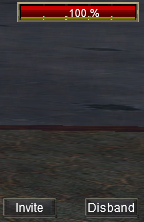
- Now your groupmember 1 section in AutoHealer should look like this. The numbers for you will be different since your location/pixel color on your screen is different than mines.
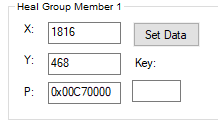
- Thats it! Don't forget to save!

* Now lets setup your actual spell casting. We will do this inside of EQ.
Setting up Spell Casting
- To heal my groupmember 1 what I would do is setup a EverQuest Social macro. Type /hot HealGrp1 in game. This will create a hotbutton. Drag that to your number 1 slot.
Download
- You can download the latest version of AutoHealer here: DOWNLOAD
DPS System
- dpsspell1 This script will autoassist the player or mainassist you specified in the client, and cast your DPS Spell 1, and auto sit after the spell has casted.
- dpsspell2 This script will autoassist the player or mainassist you specified in the client, and cast your DPS Spell 2, and auto sit after the spell has casted.
